
.png)
Fintech Digital Transformation
1. The Challenge: "The Hanko Bottleneck"
(Note to Reader: In Japan, the 'Hanko' is a personal seal used to sign documents. It is often the enemy of speed.)
Despite having a solid customer base, our client was bleeding efficiency. Their core banking system was a "black box"—stable but impossible to change.
- The Workflow Trap: To approve a simple loan or update a customer address, staff had to print a form, get three physical stamps (Hankos) from managers, and then manually re-enter the data into the mainframe.
- The Data Silo: Customer data was stuck on-premise. Sales staff visiting clients had no real-time access to account history, forcing them to call the branch for every simple query.
- The Risk: Smaller, agile fintech startups were stealing their younger customers who demanded a mobile-first experience.
The Ask: "We don't want to replace our core mainframe (it’s too risky). But we need to act like a digital bank."
.png)
2. The Pivot: Building the "Lean" Hybrid Kubernetes Cluster
We didn't just "optimize";2. The Strategy: The "Anti-Corruption" Layer
We didn't rewrite their core. We wrapped it.
We utilized the Anti-Corruption Layer (ACL) pattern. This is a safety barrier that translates modern API requests (from mobile apps) into the legacy formats (ISO 8583/Cobol) that the old bank system understands.
- Middleware: Node.js (Express) on a private AWS Cloud.
- Security: Mutual TLS (mTLS) encryption to ensure no data ever travels unencrypted between the app and the bank’s internal network.
3. The Solution: A Two-Pronged Attack
We built two distinct interfaces: one for the Customer and one for the Bank Staff.
A. The Customer Mobile App (React Native)
We prioritized speed and trust. We used React Native to deploy to iOS and Android simultaneously without doubling the budget.
Key Features:
- Biometric Login: FaceID/TouchID implementation to replace clunky passwords.
- Digital KYC: Users can scan their ID and update their profile instantly, removing the need to visit a branch.
- Real-Time Transfers: Integrated with the Zengin System (Japanese payment network) for instant settlements.
[VISUAL PLACEHOLDER 1: MOBILE APP UI]
(Use Google Stitch / Design Tool to create a 3-screen spread here)
- Screen 1 (Left): Clean Login screen with Biometric icon.
- Screen 2 (Center): The "Home" Dashboard showing balance (in Yen), recent transactions, and a "Quick Transfer" button.
- Screen 3 (Right): A "Success" screen showing a completed transfer with a digital stamp.
> Caption: The new customer interface: From login to transfer in under 15 seconds.
B. The Operations Dashboard (React/Next.js)
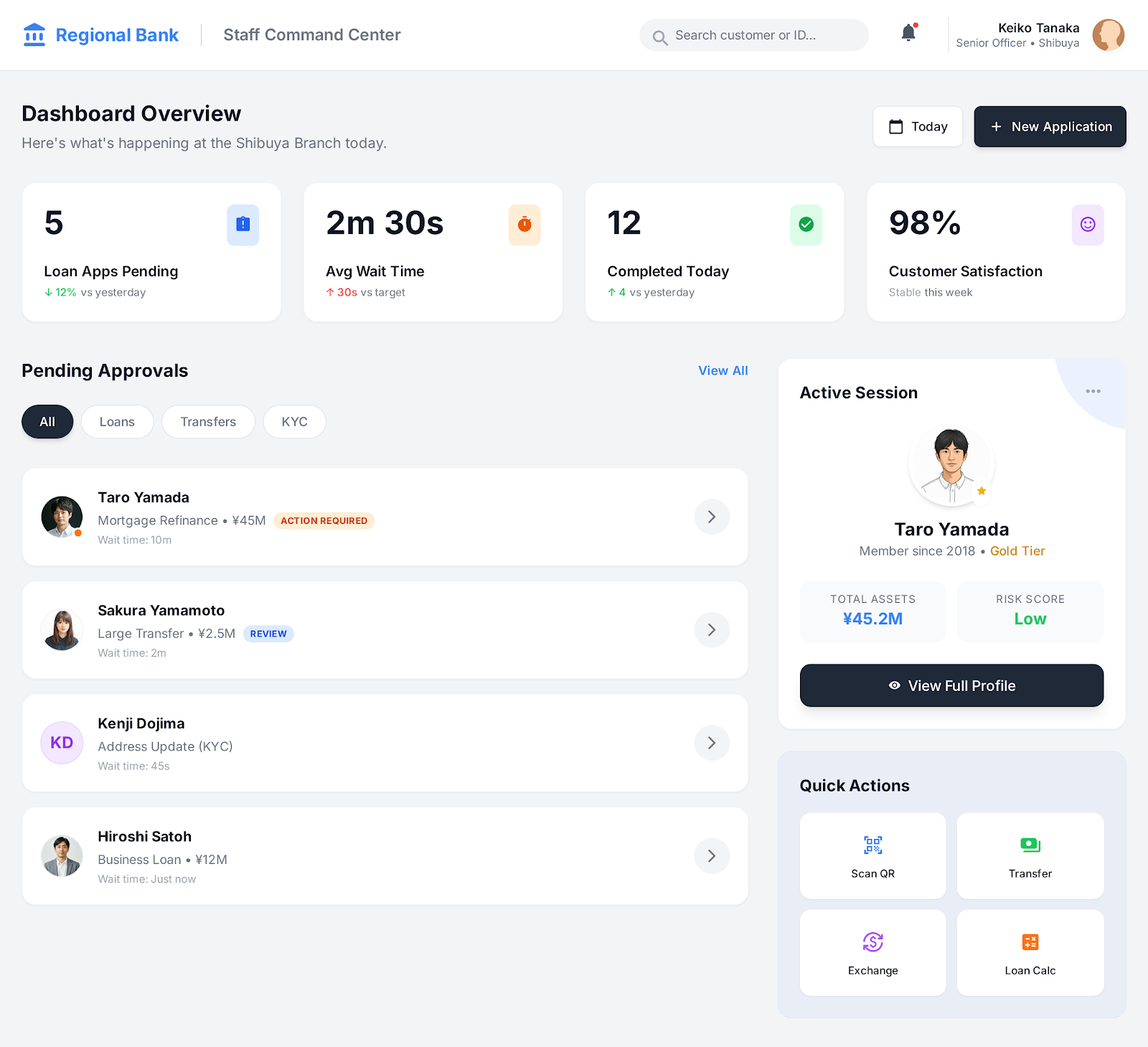
This was the game-changer for the staff. We built a web-based "Command Center" that aggregates data from the legacy system into a modern UI.
Key Features:
- OCR Integration: Staff can scan physical paper forms; the system automatically reads the Japanese text and populates the database fields.
- Approval Workflows: Replaced physical Hanko stamps with "Digital Approvals." A manager gets a notification, clicks "Approve," and the transaction clears.
- 360 Customer View: When a customer calls, the support staff sees their entire history on one screen—loans, savings, and recent interactions.
[VISUAL PLACEHOLDER 2: OPERATIONS DASHBOARD]
(Use Google Stitch / Design Tool to create a Desktop Monitor view)
- Visual: A wide dashboard showing a list of "Pending Approvals" on the left, and a "Customer Profile" with graphs on the right.
Data Points to Mock: "Loan Applications Pending: 5", "Average Wait Time: 2m 30s".> Caption: The Staff Command Center: Digitizing the approval workflow and removing paper trails. we re-architected. We decided to move to a Hybrid Kubernetes (K8s) model.
The Core Strategy:
- Baseline on Metal (On-Prem): We took their existing on-prem servers, wiped them, and installed bare-metal Kubernetes. This cluster now handles 70% of the daily traffic (browsing, search, static content). Cost? Electricity.
- Burst on Cloud (AWS EKS): We set up a lightweight AWS EKS cluster. It sits dormant (scaled to zero) most of the day. But when traffic hits a threshold (like a Flash Sale), the Horizontal Pod Autoscaler (HPA) wakes up the AWS nodes and spills the excess traffic there.
Technical Detail: We used Cilium as the CNI (Container Network Interface) to create a transparent mesh between the Tokyo office servers and the AWS VPC. To the application code, it looks like one big network.
3. Visualizing the Architecture (Before vs. After)
[PLACEHOLDER: ARCHITECTURE DIAGRAM]
You need a diagram that clearly shows the "Messy Cloud" vs. the "Clean Hybrid" setup.
Use this Prompt to Generate the Image:
Prompt: "A split-screen technical architecture diagram. Left side labeled 'BEFORE: Bloated AWS Monolith' showing chaotic tangled lines, multiple expensive server icons labeled 'm5.4xlarge', and red dollar signs. Right side labeled 'AFTER: Lean Hybrid Kubernetes' showing a clean, organized structure with a 'Core On-Prem Cluster' connected via secure tunnel to a 'Burst AWS Cloud' section. Blue and green color scheme, isometric engineering style, white background, high detail."
4. The "Watchtower": Custom AIOps & Grafana
With a hybrid system, you can't just use AWS CloudWatch (because half your servers aren't on AWS). We had to build our own eyes.
We deployed a Grafana + Prometheus stack that pulls metrics from both the on-prem metal and the AWS cloud. But we went deeper. We built a custom Python Middleware that acts as an "AI Sentry."
How the AI Middleware Works:
Instead of alerting us on every error, the middleware aggregates logs and uses a small LLM model to "read" the situation.
- Raw Log: Connection timeout on DB-01
- AI Interpretation: "Database connection is timing out only on the On-Prem cluster. AWS nodes are healthy. Likely cause: Local switch saturation. Switching all traffic to AWS automatically."
[PLACEHOLDER: THE GRAFANA DASHBOARD]
This needs to look like a command center.
Use this Prompt to Generate the Image:
Prompt: "A futuristic dark-mode Grafana dashboard for IT monitoring. The screen is filled with real-time data visualizations: a large central line graph showing traffic spikes in green, a heatmap on the right showing server load, and a log stream at the bottom with code snippets. In the top corner, a 'System Health: 99.9%' badge. Neon green and deep blue accents, highly detailed UI design, 4k resolution, photorealistic screen capture."
5. The User Experience: Fast, Even When the Servers Are Melting
The backend improvements meant nothing if the app felt slow. We rebuilt their mobile experience using React Native, focusing on "Optimistic UI."
Even if the backend takes 500ms to process a "Buy" request, the app confirms it instantly to the user, queuing the request in the background.
[PLACEHOLDER: MOBILE APP SHOWCASE]
Show the slick, high-end fashion interface.
Use this Prompt to Generate the Image:
Prompt: "Three mobile phone screens standing upright in a row, displaying a high-end fashion e-commerce app. The left screen shows a 'Luxury Watch' product page with a clean white interface and sharp typography. The middle screen shows a 'Live Inventory' countdown timer. The right screen shows a 'Purchase Successful' animation with a green checkmark. Elegant, minimalist Japanese design aesthetic, soft studio lighting, high-quality 3D render."
6. The Hard Data: Verification & Impact
We don't guess; we measure. Here is exactly how the move to the Hybrid K8s model changed their bottom line.
4. The Technical Stack (Engineered for Compliance)
Banks care about one thing above all else: Security. We selected a stack that passes the strictest audits.
5. The Results: 20% Efficiency Gain
We launched the pilot in 6 months. The data from the first year of operation was clear:
- 20% Time Saved: By removing manual data entry and physical stamping, the average staff member saved 1.5 hours per day. This allowed them to focus on high-value tasks like selling loans or advising clients.
- Error Reduction: The OCR and validation logic reduced data entry errors by 90%.
- Adoption: 45% of the bank's existing customer base migrated to the app within the first 3 months.
"We were drowning in paper. This system didn't just digitize us; it gave us our time back."
— Director of Operations, [Bank Name Redacted]
SEO Meta Data Implementation
To be added to your CMS (WordPress/Webflow) for Google Optimization:
- Title Tag: Digital Transformation Case Study: Modernizing a Japanese Bank
- Meta Description: See how we helped a legacy Japanese bank migrate to the cloud. Our React Native and Node.js solution reduced staff workload by 20% and automated compliance.
- Slug: /case-studies/banking-digital-transformation-japan
- Alt Text for Images: "Mobile banking app UI design showing biometric login," "Bank operations dashboard showing digital workflow automation."
.png)
.png)